
Accessibility on Demand · Municipal World
Make municipal PDFs more accessible. Start with one document.
Agendas, reports and public documents keep coming. AoD helps your team remediate scanned and digital PDFs online, then review the results before publishing.
Get my 250 free creditsSee the 3-minute demoNo credit card required · No software to install
Account access sent by email · Support from Polar Imaging
See the workflow. Then try your own PDF.
Watch the three-minute walkthrough, or go straight to your free account request. No software to install.
Try my own PDF freeA practical starting point for PDF accessibility
Need a larger view? Open the demo separatelyA familiar report, agenda, or document is a good first test. Polar Imaging can help if you get stuck.
Get your free AoD account
250 free credits · No credit card required
We will email your access instructions once your account is ready.
A practical way to start
Less manual work. More progress on your PDFs.
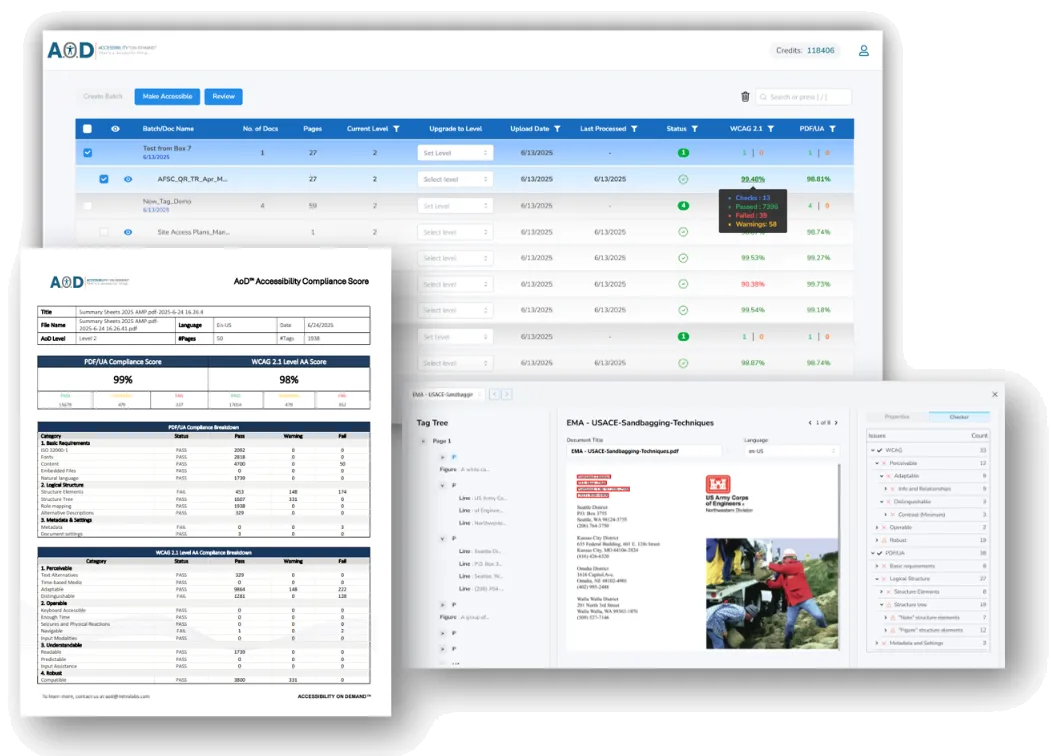
Test the workflow on a document your team already knows. Compare the output with the original and use the available report to guide your review.
Upload your PDFs
Work with scanned or digital PDFs, individually or in batches. Start with a familiar report, agenda or everyday document.
Choose your level
Match the remediation level to the document, its audience and the review your team needs.
Review and download
Download your processed PDF with its built-in PAC compliance score and report. See the results in AoD before publishing or sharing.
Built for everyday PDF accessibility
Why teams choose Accessibility on Demand
Make progress on your PDF backlog with automated remediation, a straightforward online workflow and pricing you can plan around.
Less manual remediation
Use AI-powered tagging and OCR for scanned and digital PDFs. Process individual files or batches, with advanced table and image remediation available at Enhanced.
One online workflow
Upload, choose a service level, then review and download. No desktop software to install, with Polar Imaging support when you need help getting started.
Built-in PAC validation
AoD automatically checks your remediated PDFs using the third-party PAC (axes4) checker. Your compliance score and report are included in the same workflow, with no separate checker to run.
Clear Canadian pricing
PDF accessibility remediation from C$0.44 per page, with service levels to fit your documents and budget.
250 free credits · No credit card required
Choose the right starting point
Clear per-page pricing. Start free.
Start with 250 free credits. Buy credits and use them per page at the level you choose, with built-in PAC validation and reporting included. Paid credits are C$0.44 each. All prices are in Canadian dollars.
1 credit per page
Standard
C$0.44 per page
A starting point for internal, archival or large-volume documents.
- Automated tagging for headings, paragraphs, lists and tables
- OCR for searchable text
- Logical reading order and basic image alt text
- Built-in PAC compliance score and report
6 credits per page
Enhanced
C$2.64 per page
A practical first test for public-facing PDFs and documents with visual content.
- Everything in Standard included
- Contextual AI-generated alt text
- Advanced table, chart and list remediation
- Configurable bookmarks
- Built-in PAC checks against WCAG and PDF/UA
40 credits per page
Expert Review
From C$17.60 per page
For important or complex documents that need expert human review.
- Enhanced features included
- Human review of remediation
- Support for complex document requirements
PAC checking is included in AoD, with no separate checker for your team to run. The compliance score reflects automated check results, not a certification of complete accessibility. Source-document limitations can affect results; see the FAQ for details.
Your AoD questions, answered
What do my free credits cover?
Your 250 complimentary credits let you test real PDFs from your organization. Standard uses 1 credit per page, Enhanced uses 6, and Expert Review uses 40. For example, you can process up to 250 pages at Standard or 41 pages at Enhanced. Mixed levels use the same credit balance. Check the required credits before processing.
Do I need a credit card or a software installation?
No credit card is required to request your free account. AoD runs in your browser, so there is no desktop software to install. You can evaluate the results before deciding whether to purchase more credits.
What happens after I sign up?
Submit the form below using your work email. Once your account is ready, you will receive access instructions and a welcome email. Then upload a familiar PDF, select a service level, and review the output. Polar Imaging can help with access or an optional walkthrough.
Which service level should I try first?
Enhanced is a practical starting point for public-facing documents with tables, images, or complex layouts. Standard suits initial structural tagging and large backfiles. Expert Review adds human review for documents that need closer attention. Use a representative sample to assess fit.
Can I upload scanned PDFs and process several documents together?
Yes. AoD supports scanned and digitally created PDFs, including batch processing. Scan quality and document complexity affect results. Start with a clear, representative document, then compare the output with the original before expanding your batch.
Can AoD handle fillable forms?
Fillable forms need additional checks for field labels, tags, reading order, and keyboard use. Contact Polar Imaging to confirm the form workflow available in your account and assess a sample before processing a large batch of forms.
How does AoD check my PDFs and calculate the compliance score?
PAC (PDF Accessibility Checker by axes4) validation is built into AoD. Your remediated PDF is checked against WCAG and PDF/UA, and the score and report are provided within the same workflow. You do not need to run a separate checker.
The compliance score is calculated as (total checks minus failed checks) divided by total checks, expressed as a percentage. It describes the automated checks, rather than certifying complete accessibility. Some aspects require human judgment, and source-document limitations, such as poor contrast in a scan, can affect results. Expert Review is available when your document or governance process calls for human review.
What should I know before uploading sensitive documents?
Follow your organization's information-handling policies. Confirm hosting region, retention, access, and deletion requirements with Polar Imaging before uploading confidential records. Download the outputs you need and retain them in your approved repository.
Can someone help me get started?
Yes. AoD is self-serve with support from Polar Imaging. You can request a walkthrough or help choosing a first document. After testing, contact the team for additional credits and the purchase route appropriate to your account.
Ready to try your own PDF?
Start with 250 free credits and a familiar document. No credit card required. Support from Polar Imaging is included.
Get my free AoD account